
DrawPic Edit Text in Image
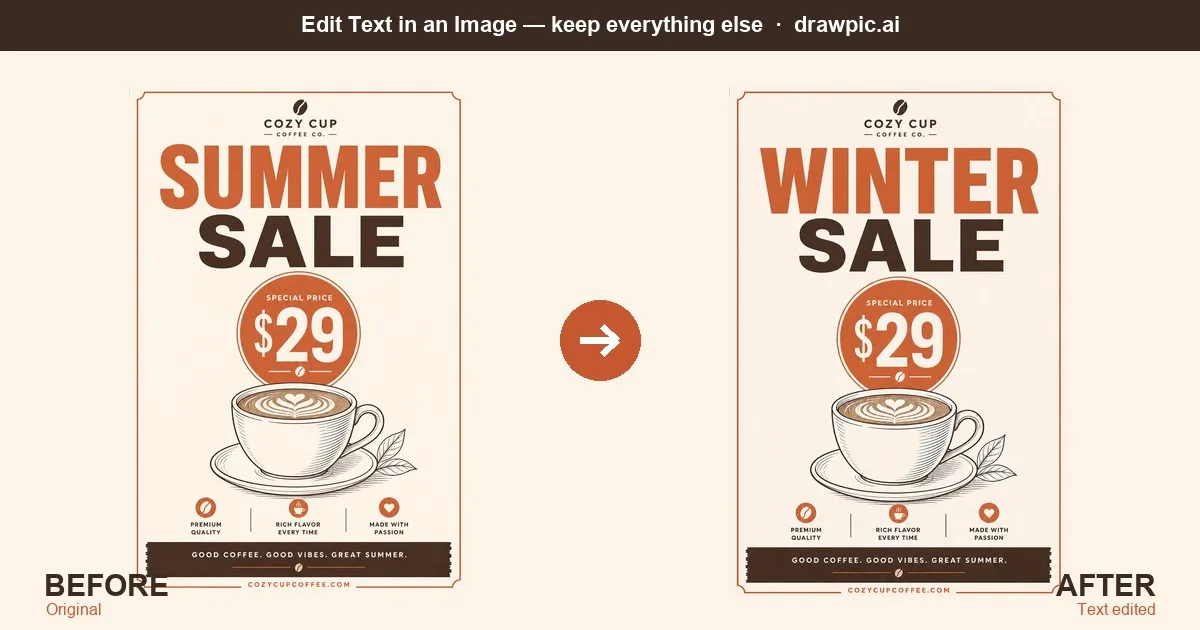
Draw a box around the text you want to change, type the new text, and get the edited image back. Works on posters, menus, ads and long screenshots. Free to try.
Alternatives to DrawPic Edit Text in Image
All Photo Editing tools
SwapFaceHub
SwapFaceHub is a free online AI face swap tool: upload a target photo and a source face, then download a watermark-free result. Guests get two free photo swaps with no account; video face swap is available separately for accounts with credits.

Image26
AI image generator and photo editor powered by GPT Image 2.6. Posters, logos, thumbnails and comics with accurate text. Export up to 4K.

AnyImg
AnyImg is an AI Image Editor that lets you edit photos with simple text prompts: replace backgrounds, change outfits, remove objects, and generate images online in seconds. Free to start.

StyleGen.ai
StyleGen.ai is a web-based AI hairstyle simulator that generates realistic hairstyle and hair color previews from a single photo. Users can try 130+ cuts and 30 colors; the first preview requires no account and registered users receive five free credits per day. Guest photos are deleted after seven days.

Blur Background
Blur Background helps people reduce distracting backgrounds in photos. Choose one photo, adjust the blur strength, compare before and after, and download a static result. Free Basic runs locally on your device without sign-in and does not automatically upload the photo. Optional paid credit packs unlock AI Refined processing.

FileOnTap
FileOnTap is a free browser-based file converter. Its HEIC to PNG tool converts iPhone photos to lossless PNG right on your device: files never leave your computer, no account needed, batches of up to 10 photos, and it works on Windows 11, Mac and Linux. PNG keeps full quality for editing, watermarks and cut-outs.